
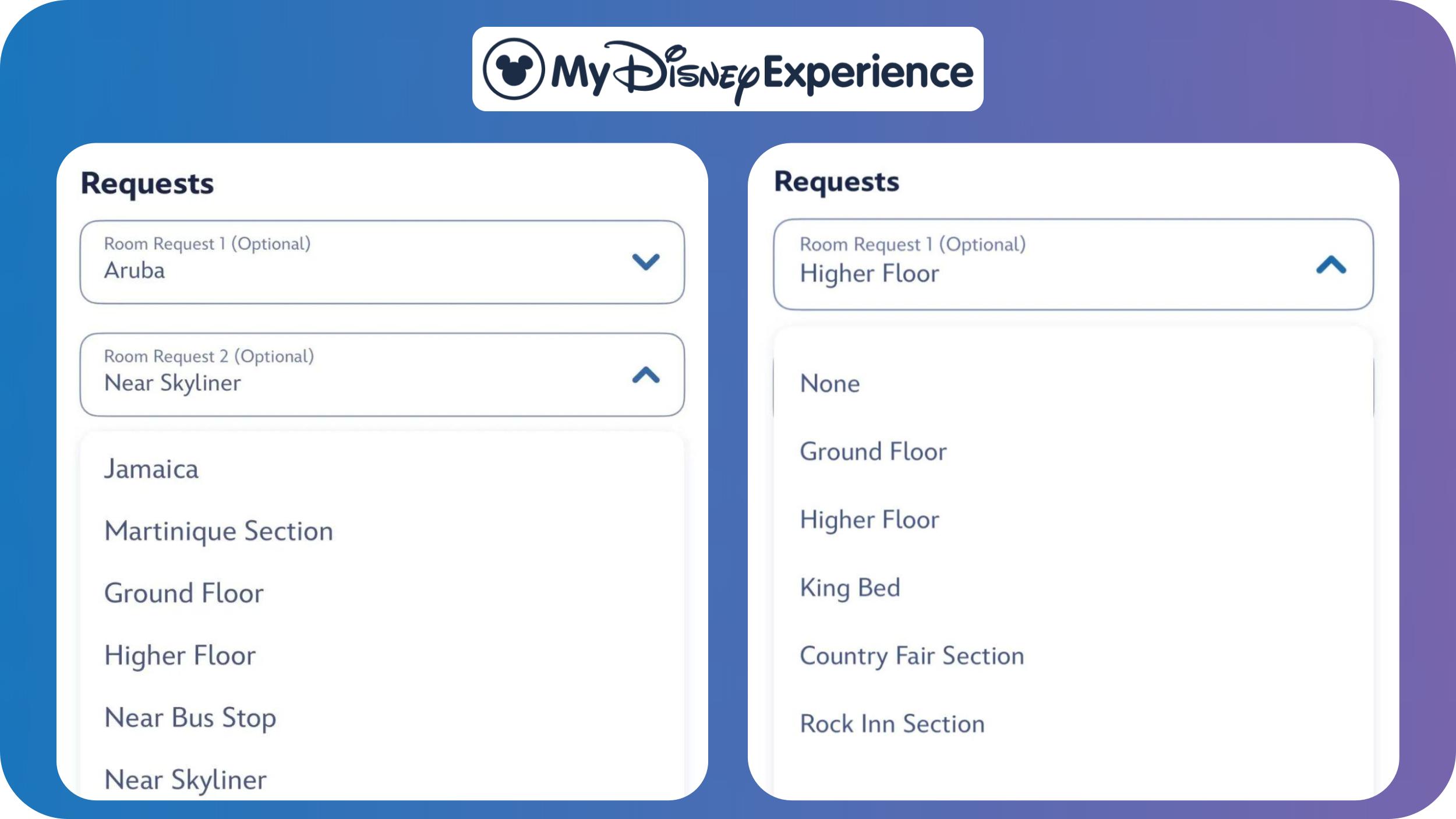
Walt Disney World guests preparing for an upcoming hotel stay now have access to a more detailed room request tool inside the My Disney Experience mobile app. Rather than selecting from a small pool of generic preferences, visitors can now choose options tailored to their specific resort hotel and room category, including individual building sections, bed configurations, and proximity to transportation hubs.
How the Updated Room Request Tool Works

When completing online check-in or modifying an existing reservation in the My Disney Experience app, guests will find an updated interface on the room request screen. The system presents two primary controls at the top of the page to help Disney’s room assignment team process guest priorities.
First, there is a checkbox labeled Prioritize Room Readiness. Selecting this option informs the resort that getting into a room as early as possible on arrival day is more important than the physical location or attributes of the room. If this box is checked, the system will assign the first available room in the booked category, even if it bypasses the guest’s specific location requests.
Second, the app provides two separate request dropdown menus. Guests can select up to two room attributes from the available list. Based on the current functionality of the app, these two selections operate as independent preferences rather than a combined requirement. The room assignment system attempts to place the party in a room that satisfies either the first choice or the second choice, rather than guaranteeing a room that meets both criteria simultaneously.
New Resort-Specific Dropdown Options


Previously, the online check-in system often suffered from overly broad or missing options, leading many guests to call the Walt Disney World reservation line to have a cast member manually add notes to their reservation file. The updated dropdown menus now dynamically filter choices based on both the specific resort hotel and the exact room tier booked.
For instance, if a guest books a Standard View room, the dropdown menu will automatically exclude Preferred View building sections from the selectable list. This prevents guests from accidentally wasting a request slot on a building section that requires a paid room upgrade.
Below are examples of the options currently appearing for different Walt Disney World properties:
- Disney’s Caribbean Beach Resort (Standard Rooms): Aruba, Jamaica, Martinique Section, Barbados Section, Ground Floor, Higher Floor, Near Bus Stop, and Near Skyliner.
- Disney’s All-Star Music Resort (Standard Rooms): Country Fair Section, Rock Inn Section, King Bed, Ground Floor, and Higher Floor.
Strategy for Submitting Your Preferences
Because Walt Disney World resorts can cover hundreds of acres, choosing the right request can noticeably impact daily commute times to the theme parks. Having access to targeted preferences like Near Skyliner at Disney’s Caribbean Beach Resort gives the room assignment team clear, actionable data compared to older, generic requests.
To help decide how to configure the settings in the My Disney Experience app, consider the following breakdown of the available features:
| Feature | How It Works | Recommended Strategy |
|---|---|---|
| Prioritize Room Readiness | Overrides location preferences to assign the earliest available clean room. | Check this box only if you have a morning flight arrival and need a place to nap or unpack before heading to the parks. |
| First Request Slot | Selects a primary location, floor level, or bed type preference. | Choose your most important criterion, such as a specific village section or proximity to a transportation hub. |
| Second Request Slot | Functions as an alternative preference if the first choice is unavailable. | Select a secondary option that you would be happy with if your primary section is full, such as Ground Floor or Near Bus Stop. |
What Guests Should Keep in Mind
While the expanded menu makes it much easier to communicate preferences directly through the app, Disney continues to remind guests that room requests are not guaranteed. Fulfilling these selections depends entirely on resort occupancy levels, maintenance schedules, and checkout patterns on the day of arrival.
Additionally, certain specific architectural requests, such as rooms with a traditional bathtub instead of a walk-in shower, may not appear in the dropdown list for every property. Guests who have medical needs or specific questions about bathroom layouts may still want to contact Disney directly by phone or use the in-app chat feature prior to arrival.
The updated room request system is active now inside the My Disney Experience mobile app. By aligning the digital request options with the actual layouts and room categories of each property, the update simplifies the pre-arrival planning process and gives visitors a clearer way to customize their resort stay.
Written by
Rachel Van Norman
Contributing Writer
Rachel fell deeply in love with all things Disney as a little girl. Now as a wife and a mother herself, she shares this Disney obsession with her son and everyone around her. From her love of princesses to eating all the Disney food, Rachel spends her time radiating Disney magic and keeping everyone up to date on Disney news.


